Connect events
in one show
When a visitor presses a button, turn on a light. After a moment, start a mechanism and sound. Arrange dependencies so the layout performs the next steps in the order you choose.
The signal activates a condition, followed by light, motion and sound.
A condition, an action and the next step in the scene
Decide what
happens next
Individual devices become a show when you define their order and how they depend on each other.
Conditions and actions
Build “if X, do Y” rules based on device signals and states.
Sequences with delays
Set the actions and the time between them. Let one element finish before the next starts.
Device groups
Start several elements with one action, such as lighting an entire street.
Schedule
Schedule selected actions to suit the rhythm of your exhibition.
Panel buttons
Assign a prepared sequence to a button and give the operator clear controls.
State-based dependencies
Make the next action depend on a signal from the layout. Test the rules with your hardware before the show.
How will you use it
on your layout?
Museum presentation
A button starts lighting in the first zone, followed by movement and commentary. Each action has its place in the scene.
Day turns into night
Street lights and windows come on one after another, while the audio ambience changes to evening city sounds.
A mechanism in sequence
An open gate signals the next step. Movement and lighting follow one sequence.
From an event
to a show
An event reaches a rule. When its condition is met, the app performs the assigned actions and the controllers pass them to the devices.
- 01Trigger
Event
Button, time or state
- 02Logic
Condition
Rule in the app
- 03Order
Sequence
Actions and delays
- 04On the layout
Layout
Light, movement and sound
What to prepare
Materials and wiringPanel and inputs
Buttons, sensors and device states provide signals for the rules.
Controllers
They connect the app to the devices that perform each action.
Layout elements
Choose lights, drives and audio equipment for the scene you want to run.
Prepare your setup
All connections
See controllers, expanders and end devices together in one view.
View the architectureYour first action on the layout
Connect an LED or servo, then check the device’s response.
Choose a starter diagramStart each device separately first. Then combine the tested actions into a sequence.
Expand your layout
Hardware, effects and files from the catalogue. Match them to the devices and scenes you are working on.
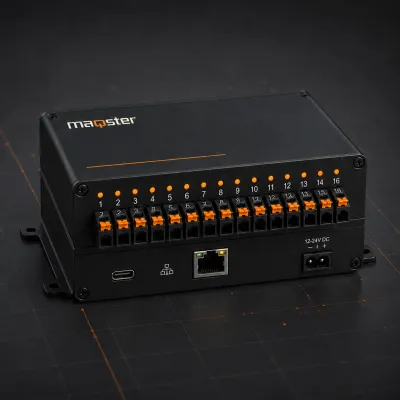
Input and output controller
16 configurable I/O channels for layout automation.
View product Coming soon
“City at Night” scene
A ready-made lighting and movement scene for your layout.
View category Coming soon